Introduction to Dental CAD vs Manual Design: Cost and Quality Comparison 2026
The dental industry is rapidly evolving, and by 2026, the choice between dental CAD and manual design methods has become a critical factor influencing both cost and quality for dental labs and DSOs. Dental CAD vs manual design: cost and quality comparison 2026 presents an in-depth look at how these two approaches differ and what that means for dental professionals outsourcing their design work.
Dental CAD (computer-aided design) leverages advanced software to create precision dental restorations, while manual design relies on traditional handcrafting techniques. Understanding the nuances of each method is essential for labs aiming to optimize workflows, reduce costs, and deliver superior patient outcomes.
What Is Dental CAD and How Does It Work?
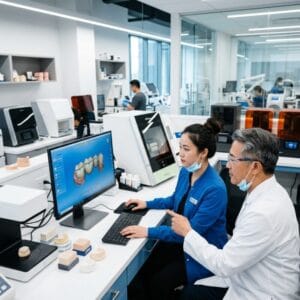
Dental CAD is a digital process that uses specialized software to design dental restorations with high precision and repeatability. Typically, the process begins with intraoral scanning or 3D impressions, which generate accurate digital models of patients’ teeth. These models are then imported into CAD software—such as 3Shape or exocad—where dental technicians or designers create crowns, bridges, dentures, implants, orthodontic aligners, night guards, and surgical guides.
This digital workflow replaces manual sculpting and waxing, allowing for faster adjustments, enhanced visualization, and better integration with CAM (computer-aided manufacturing) systems. Dental CAD designs can be sent directly to milling machines or 3D printers, reducing turnaround times and minimizing human error.
How Does Manual Dental Design Differ from CAD?
Manual dental design involves traditional handcrafting techniques where skilled technicians sculpt restorations physically using wax or other materials. This method relies heavily on the technician’s experience and artistic ability to create anatomically accurate and functional restorations.
The process is typically more labor-intensive and time-consuming, involving multiple physical steps such as wax-ups, casting, and fitting. Despite advances in digital technology, some labs prefer manual design for certain complex cases or specific restorative materials that require tactile handling. However, manual methods are often prone to variability and are less scalable compared to digital workflows.
Dental CAD vs Manual Design: Cost Comparison for 2026
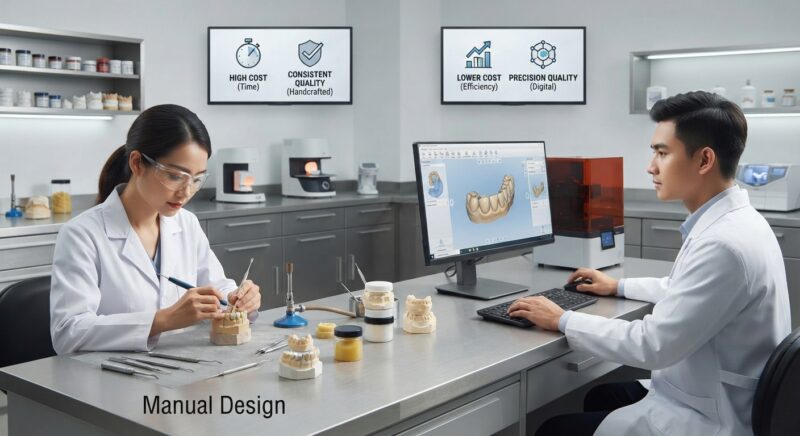
When evaluating Dental CAD vs manual design: cost and quality comparison 2026, cost remains a paramount consideration. Dental CAD requires upfront investment in software licenses, hardware such as scanners and computers, and staff training. However, over time, these expenses are offset by reduced labor hours and material waste.
Manual design incurs lower initial technology costs but demands higher skilled labor costs and longer production times. For many dental labs and DSOs, outsourcing dental CAD design services offers a cost-effective solution by eliminating capital expenditure and enabling access to expert digital designers.
- Initial Costs: Dental CAD setup can range from $50,000 to $150,000, while manual design mainly involves labor and material costs.
- Per-Unit Cost: CAD designs often reduce per-unit costs by 20-40% due to increased efficiency.
- Labor Savings: Digital workflows require less repetitive manual labor, lowering staffing expenses.
Outsourcing dental CAD design further enhances cost savings by leveraging economies of scale and expert workflows optimized for crown & bridge, implant, and orthodontic cases.
Quality Comparison: Which Method Produces Better Dental Restorations?
In the Dental CAD vs manual design: cost and quality comparison 2026, quality is a crucial metric. Digital design offers unparalleled precision, repeatability, and customization capabilities. CAD software can simulate occlusion, contact points, and material thickness, reducing remakes and chairside adjustments.
Manual design, while capable of producing aesthetically pleasing results, is more susceptible to human error and inconsistency. Complex cases such as surgical guides and implant abutments benefit significantly from CAD’s accuracy, which translates into improved clinical outcomes.
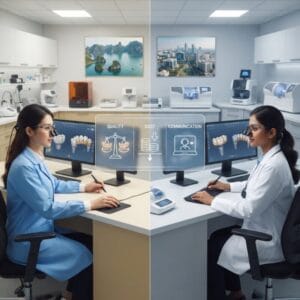
Furthermore, digital archives enable easy modifications, quality audits, and tracking, which manual wax-ups cannot match. Dental CAD designs also facilitate better communication with dental practices and laboratories, contributing to higher patient satisfaction.
What Are the Key Benefits of Outsourcing Dental CAD Design Services?
Outsourcing dental CAD design services provides access to specialized expertise, cutting-edge technology, and scalable workflows without large capital investments. Dental labs and DSOs can reduce turnaround times, improve quality control, and remain competitive by partnering with experienced design providers.
- Access to Experienced Designers: Outsourcing connects you with professionals trained in the latest CAD software and dental materials.
- Scalability: Easily handle fluctuating case volumes without hiring additional staff.
- Technology Updates: Benefit from software and hardware upgrades without direct cost.
- Focus on Core Lab Functions: Allow your team to concentrate on manufacturing and finishing while the design work is handled externally.
This approach is especially advantageous for labs producing crown & bridge restorations, implants, dentures, orthodontic aligners, and night guards, all of which demand precise digital workflows.
How Does the Integration of CAD/CAM Improve Production Efficiency?
The integration of CAD/CAM technology streamlines dental prosthetic production by automating design-to-manufacture workflows. Digital design files created through CAD systems are directly utilized by CAM equipment such as milling machines or 3D printers, significantly shortening production cycles.
This seamless transition reduces manual errors, enhances reproducibility, and enables rapid prototyping and adjustments. For example, surgical guides designed digitally can be printed within hours, improving surgical outcomes and patient scheduling.
Additionally, CAD/CAM integration supports a broader range of materials, from zirconia to PMMA, enhancing versatility. Labs that outsource CAD design can quickly adopt these efficiencies without the need to overhaul existing manufacturing infrastructure, making this technology vital in the 2026 dental landscape.
What Are Common Challenges in Manual Dental Design That Digital Solutions Address?
Manual dental design presents challenges such as longer turnaround times, greater variability, and increased likelihood of errors that digital solutions effectively mitigate. Physical wax-ups and casting steps are laborious and sensitive to technician skill and environmental conditions.
Manual processes often face issues with reproducibility, especially in complex implant cases or multi-unit bridges where precision is paramount. These challenges can lead to increased remakes, patient discomfort, and higher costs.
In contrast, dental CAD offers digital precision, standardized workflows, and easy file sharing, reducing miscommunication and enhancing quality control. Outsourcing digital design services allows labs to overcome these hurdles while focusing on production excellence and customer service.
How Are Trends in Dental Technology Shaping the Future of Lab Design Services?
Emerging trends in dental technology, including AI-assisted design, cloud-based collaboration, and advanced materials, are shaping the future of lab design services toward more digital and outsourced models. AI algorithms integrated into dental CAD software help automate tasks such as margin detection and occlusal adjustments, speeding up design processes and reducing human error.
Cloud platforms enable seamless collaboration among dental practices, labs, and design outsourcing partners, ensuring real-time updates and traceability. These technological advances support the growing demand for customized restorations and complex appliances like orthodontic aligners and night guards.
Dental labs investing in these innovations or partnering with specialized CAD design providers will be better positioned to meet evolving clinical needs and deliver exceptional quality and cost efficiency by 2026.
Comparing Clinical Outcomes: Digital vs Manual Design in Implant and Orthodontic Cases
In implant and orthodontic cases, Dental CAD vs manual design: cost and quality comparison 2026 becomes even more significant due to the complexity and precision required. Digital design enables exact fit and positioning of implant abutments and surgical guides, reducing surgical errors and improving osseointegration rates.
Orthodontic aligners benefit from CAD designs that allow precise tooth movement staging and customization, which manual methods cannot replicate efficiently. Night guards and dentures designed digitally also exhibit superior fit and patient comfort.
Studies have shown that digital design reduces adjustment appointments and remakes, translating into better patient satisfaction and cost savings for dental labs and DSOs. These clinical advantages strongly favor the adoption of CAD workflows or outsourcing digital design services.
How Can Dental Labs Choose the Right Outsourcing Partner for CAD Design?
Selecting the right outsourcing partner for dental CAD design requires evaluating expertise, technology capabilities, turnaround times, and communication protocols. Labs should look for providers experienced in crown & bridge, implants, dentures, and orthodontic appliances to ensure comprehensive service offerings.
Technology compatibility is crucial; the partner should utilize widely adopted CAD software like Medit scanners or Dentsply Sirona design platforms for seamless integration. Transparency in pricing and quality control procedures is also essential to maintain trust and predictability.
Additionally, consider partners that offer flexible service levels, from full design outsourcing to collaborative workflows that complement your in-house capabilities. This strategic approach helps labs maximize the benefits outlined in the Dental CAD vs manual design: cost and quality comparison 2026 analysis.
Conclusion: Embracing Digital Design to Stay Competitive in 2026
The comprehensive Dental CAD vs manual design: cost and quality comparison 2026 clearly demonstrates the growing importance of digital design in dental labs and DSOs. While manual design maintains a role in certain niche applications, the cost efficiency, quality improvements, and workflow enhancements offered by dental CAD are undeniable.
Outsourcing dental CAD design services allows labs to leverage the latest technologies and expert skills without large capital investments or steep learning curves. This strategic shift supports faster turnaround times, improved clinical outcomes, and scalable production capabilities essential for thriving in the competitive dental market of 2026 and beyond.
Integrating digital design also complements other advanced services such as surgical guide design and implant planning, creating a holistic digital ecosystem that benefits all stakeholders.
Contact Us for Expert Dental CAD Outsourcing Solutions
Step-by-Step Guide to Implementing Dental CAD in Your Lab or Practice
Transitioning from manual dental design to CAD-based workflows requires careful planning and execution. Below is a practical step-by-step approach to help dental labs and practices integrate dental CAD technology smoothly and effectively.
1. Assess Your Current Workflow and Needs
- Audit existing processes: Document your current design and fabrication steps, identifying bottlenecks and pain points.
- Define goals: Are you aiming to reduce turnaround time, improve consistency, cut costs, or expand service offerings?
- Evaluate staff skills: Determine the level of CAD proficiency among your team and identify training needs.
2. Research and Select Appropriate CAD Software and Hardware
- Software compatibility: Choose CAD software that integrates well with your scanners and milling machines or 3D printers.
- Feature set: Consider software capabilities such as anatomical libraries, automated margin detection, and prosthetic design options.
- Hardware requirements: Ensure your computers meet recommended specifications and invest in high-quality intraoral or model scanners.
3. Train Your Team
- Formal training sessions: Arrange for vendor-led or third-party courses to familiarize your team with the software interface and workflow.
- Hands-on practice: Encourage gradual adoption by working on non-critical cases first.
- Ongoing support: Establish channels for troubleshooting and continuous learning, such as in-house champions or help desks.
4. Pilot the CAD Workflow
- Select pilot cases: Start with straightforward cases like single crowns or veneers to build confidence.
- Monitor results: Compare design accuracy, fabrication time, and patient feedback against manual methods.
- Gather feedback: Engage your technicians and clinicians for input and identify areas for process refinement.
5. Full Integration and Continuous Improvement
- Scale up: Gradually expand CAD usage to complex restorations and larger case volumes.
- Standardize protocols: Document best practices and develop checklists for quality assurance.
- Review performance metrics: Track efficiency gains, cost savings, and clinical outcomes regularly to inform adjustments.
Common Mistakes to Avoid When Adopting Dental CAD
Despite the clear benefits of dental CAD, many labs and practices encounter pitfalls that can compromise outcomes. Awareness of these common mistakes can save time, money, and frustration.
- Underestimating the learning curve: Expecting immediate proficiency can lead to suboptimal designs and delays. Allocate adequate time and resources for training.
- Ignoring hardware compatibility: Using outdated or incompatible scanners and milling units often results in data loss or inaccuracies.
- Overlooking calibration and maintenance: Failure to regularly calibrate scanners and milling machines can lead to poor fit and remakes.
- Skipping quality control checks: Relying solely on digital previews without physical verification can miss critical errors.
- Not involving clinical staff early: Lack of clinician input during design stages may lead to restorations that do not meet functional or aesthetic expectations.
- Choosing software based on price alone: Cheap or generic CAD programs may lack key features or support, increasing hidden costs long-term.
- Neglecting to update software: Running outdated versions can miss out on performance improvements and bug fixes.
Cost and Quality Considerations: Balancing Investment and Return
When comparing dental CAD and manual design, cost and quality are intertwined factors that must be carefully balanced to maximize ROI.
Initial Investment vs Long-Term Savings
Dental CAD requires capital expenditure on software licenses, hardware (scanners, computers, milling machines), and training. This upfront cost can be significant—ranging from $20,000 to over $100,000 depending on scale and sophistication. However, over time, savings accrue through:
- Reduced material waste: Precise digital designs minimize trial-and-error adjustments and remakes.
- Lower labor costs: Automated processes reduce technician chair time.
- Faster turnaround: Shorter production cycles increase throughput and client satisfaction.
- Improved case acceptance: Higher accuracy and aesthetics can lead to more referrals and premium pricing.
Quality Trade-Offs and Assurance
Manual design offers tactile feedback and the artisanal touch of experienced technicians, which remains valuable, especially for complex aesthetic cases. However, CAD excels in reproducibility, precision, and integration with digital manufacturing tools. To ensure quality:
- Invest in training: Skilled operators are essential to maximize CAD potential.
- Implement hybrid workflows: Combine digital design with manual finishing to enhance aesthetics.
- Use quality materials: The best software and hardware cannot compensate for substandard ceramics or resins.
- Adopt rigorous QA protocols: Validate digital designs with physical trial fittings and adjust as needed.
Market-Specific Pricing Dynamics
Costs and quality expectations vary by geographic and market segment:
- Urban vs rural practices: Urban areas may demand cutting-edge digital workflows to stay competitive, justifying higher investment.
- High-end cosmetic practices: Strong emphasis on aesthetics may require hybrid manual-digital approaches.
- Volume-focused labs: Prioritize speed and consistency, favoring full CAD/CAM automation.
- Insurance and reimbursement: Coverage policies can affect willingness to pay for premium restorations, impacting investment decisions.
Checklist for Evaluating Outsourced Dental CAD Design Partners
Outsourcing dental CAD design offers benefits but also risks. A thorough evaluation process minimizes mistakes and ensures alignment with your lab or practice goals.
- Technical capabilities: Confirm the partner’s software platforms and hardware to ensure compatibility and quality standards.
- Experience and portfolio: Review case studies, especially those relevant to your specialty (implantology, orthodontics, prosthetics).
- Turnaround times: Assess whether their delivery schedules meet your production needs without compromising quality.
- Communication and support: Evaluate responsiveness and availability for design clarifications or urgent requests.
- Quality assurance processes: Ask about their QA protocols, error rates, and remake policies.
- Pricing transparency: Look for clear pricing models without hidden fees, including charges for revisions or complex cases.
- Data security: Ensure compliance with data protection standards to safeguard patient information.
- Scalability: Confirm the partner’s ability to handle fluctuating volumes as your business grows.
Ready to enhance your lab’s efficiency and product quality with expert dental CAD design outsourcing? Contact us today to discover tailored solutions that fit your unique workflow and business goals.