Understanding iTero scanner vs open-STL scanners: lab compatibility 2026
The comparison between iTero scanner vs open-STL scanners: lab compatibility 2026 is critical for dental labs and DSOs aiming to streamline their digital workflows. iTero scanners are proprietary intraoral scanning systems produced by Align Technology, designed primarily for seamless integration within their ecosystem. In contrast, open-STL scanners refer to scanning devices that export universally compatible STL files, facilitating broader interoperability with a variety of CAD/CAM software and dental labs.
In 2026, the landscape of digital dental design continues to evolve, with labs requiring a clear understanding of scanner compatibility to optimize outsourcing strategies for crowns, bridges, implants, surgical guides, dentures, orthodontic aligners, and night guards. This article dives deep into the technological, financial, and workflow considerations of adopting either iTero or open-STL scanners.
What are the key technical differences between iTero and open-STL scanners?
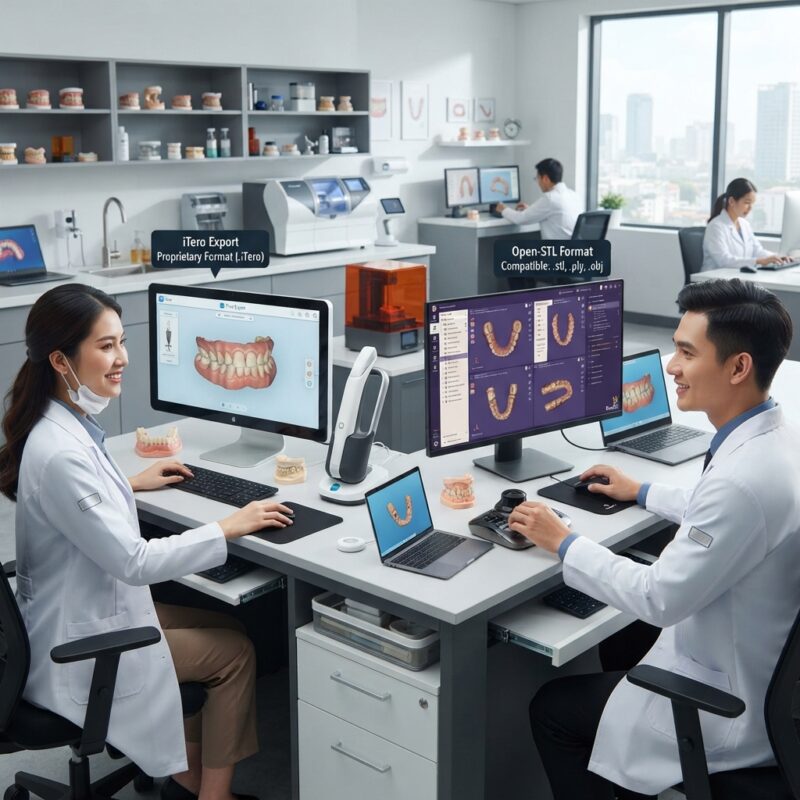
The key technical difference is that iTero scanners generate proprietary file formats that are primarily optimized for use within the iTero ecosystem, while open-STL scanners export standard STL files compatible with most CAD software.
iTero scanners leverage advanced imaging technology with integrated AI-driven margin detection and occlusal analysis, which can enhance accuracy for restorative cases. However, their closed file system means labs must either use compatible software platforms or rely on cloud-based collaboration tools from Align Technology.
Open-STL scanners, on the other hand, focus on universal compatibility. They export industry-standard STL files that can be imported into virtually any CAD software, including popular platforms like exocad and 3Shape. This openness allows labs greater flexibility in choosing design software and outsourcing partners.
How does scanner choice affect dental lab outsourcing workflows?
Scanner selection directly influences lab outsourcing workflows because it determines file compatibility, turnaround time, and design accuracy.
Using iTero scanners, dental practices and DSOs typically upload their scans directly to the iTero cloud or compatible platforms, which may limit labs to those integrated with this ecosystem. This can streamline communication but may restrict labs that prefer alternative CAD systems. Outsourcing dental CAD/CAM design with iTero scans often requires labs to have compatible software or rely on file conversion services, which could introduce delays.
Open-STL scanners provide files that labs can access immediately regardless of their CAD platform, facilitating faster design turnaround. This universal compatibility makes it easier for labs to accept digital impressions from multiple sources, improving scalability for high-volume DSOs and multi-location practices. The flexibility also supports diverse prosthetic types from crowns and bridges to orthodontic aligners and night guards.
What are the cost implications of adopting iTero vs open-STL scanners for labs and DSOs?
The cost implications vary significantly between iTero scanner vs open-STL scanners: lab compatibility 2026 scenarios, influenced by equipment, software licenses, and workflow integration.
iTero scanners typically come with a higher upfront cost, often around $25,000 to $35,000 depending on the model and included software subscriptions, with additional fees for cloud storage and design services. These costs can be justified for clinics deeply invested in the Invisalign system or those prioritizing streamlined, proprietary workflows.
Open-STL scanners vary widely in price, from mid-range devices costing $15,000 to premium models exceeding $30,000, depending on resolution, workflow features, and supported materials. Because open-STL files are compatible with a wide range of CAD software, labs can reduce costs associated with software licensing by choosing platforms that fit their budgets and needs.
Additionally, open-STL scanners may reduce long-term costs by enabling labs to leverage outsourced CAD design services flexibly, without being locked into proprietary ecosystems.
Comparison Table: iTero Scanner vs Open-STL Scanners for Lab Compatibility in 2026
| Criteria | iTero Scanner | Open-STL Scanners |
|---|---|---|
| File Format | Proprietary (iTero format, .itr) | Standard STL (open format) |
| Compatibility with CAD Software | Limited to iTero ecosystem and compatible platforms | Compatible with most CAD CAM software (exocad, 3Shape, etc.) |
| Best for | Practices invested in Invisalign, single-vendor workflows | Labs requiring flexibility, multi-vendor environments |
| Cost Range (equipment + software) | High ($25k-$35k+) | Mid to High ($15k-$30k+) |
| Workflow Impact | Streamlined for iTero users, possible vendor lock-in | Flexible, supports diverse outsourcing and design options |
Who benefits most from iTero scanners, and who should consider open-STL scanners?
Dental labs and DSOs must align scanner choice with their operational priorities. iTero scanners best serve smaller practices or DSOs heavily invested in Invisalign treatments or those who prefer a closed, integrated ecosystem that minimizes IT complexity.
- Best for: Invisalign providers, practices seeking streamlined workflows with fewer software variables.
- Strengths: Superior integration with Invisalign, AI-assisted design features, reliable customer support.
- Limitations: Limited interoperability, potential vendor lock-in, higher upfront costs.
Open-STL scanners suit high-volume labs, multi-location DSOs, and practices that value interoperability and the ability to outsource to multiple CAD/CAM design providers. Their universal file format supports diverse prosthetic types and design systems, increasing scalability and adaptability for future technologies.
- Best for: Larger labs, DSOs with multiple CAD/CAM partnerships, clinics needing versatile workflows.
- Strengths: Broad compatibility, flexible software integration, supports various restoration types.
- Limitations: May require more IT management, variable support depending on scanner brand.
How do the different scanners impact the quality and turnaround time of dental prosthetics?
Both iTero and open-STL scanners provide high-resolution digital impressions suitable for fabricating crowns, bridges, implants, surgical guides, dentures, orthodontic aligners, and night guards, but their impact on quality and turnaround differs based on ecosystem integration.
iTero scanners’ proprietary software offers advanced features like automatic margin detection and occlusal analysis, which can reduce design errors and adjustments during fabrication, potentially shortening turnaround times. However, these benefits are maximized when labs use compatible design software or rely on Align Technology’s design services.
Open-STL scanners produce universally compatible files that can be sent directly to a wide range of CAD software and outsourced design services, offering flexibility but requiring careful quality control to ensure design precision. Labs can optimize turnaround by choosing outsourcing partners experienced with STL workflows and by leveraging cloud-based collaboration tools.
What are the interoperability challenges between iTero and open-STL scanners in 2026?
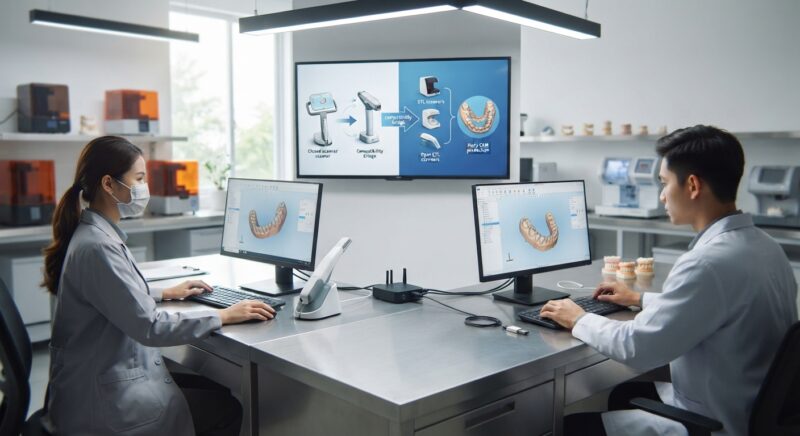
Interoperability challenges remain a significant consideration in the iTero scanner vs open-STL scanners: lab compatibility 2026 debate. iTero’s proprietary file format can complicate seamless communication with labs using non-iTero CAD software, requiring conversion tools or cloud-based transfers that may introduce delays.
Open-STL scanners benefit from universal acceptance of STL files, but differences in scan resolution, data quality, and software compatibility can affect design consistency. Labs must ensure their CAD software is optimized for the scanner’s file output and that outsourcing partners understand the nuances of STL data processing.
Strategic investment in compatible software platforms and training can mitigate these challenges. Additionally, many labs adopt hybrid workflows combining proprietary and open formats to maximize flexibility and performance.
How do scanner workflows integrate with CAD/CAM digital design outsourcing?
Scanner workflows are foundational to successful CAD/CAM digital design outsourcing, as they determine the quality and accessibility of digital impressions sent to external design teams.
With iTero scanners, outsourcing design services often require cloud-based transfer within the Align Technology ecosystem, which may limit the choice of CAD designers and labs. This can streamline communication but potentially increases dependency on a single provider for design and production.
Open-STL scanners’ universal file format enables labs and DSOs to select from a broad network of CAD design outsourcing providers. This flexibility is particularly valuable for complex cases such as surgical guides or custom dentures that may require specialized design expertise. Outsourcing also allows clinics to run milling or 3D printing equipment without hiring in-house designers, optimizing capital expenditure and labor costs.
Many design outsourcing services support multiple file formats and scanner types, further easing integration and improving turnaround.
What future trends will influence iTero scanner vs open-STL scanners: lab compatibility 2026?
Emerging trends shaping the iTero scanner vs open-STL scanners: lab compatibility 2026 debate include increased adoption of AI-assisted design, enhanced cloud collaboration, and improved open architecture in scanner software.
Manufacturers are investing in AI-driven margin detection, occlusal analysis, and automated design suggestions that improve accuracy and efficiency. Both proprietary and open systems are incorporating these technologies, but proprietary ecosystems like iTero may offer earlier access due to integrated hardware and software development.
Cloud platforms continue to evolve, enabling real-time collaboration between clinics, labs, and design specialists, regardless of scanner brand. This reduces traditional barriers imposed by proprietary formats.
Open architecture scanners and software are gaining traction, driven by demand for interoperability and reduced vendor lock-in, which will benefit labs and DSOs seeking multi-vendor flexibility in 2026 and beyond.
Do you need design capacity for your new equipment?
If you invest in new scanning equipment, whether iTero or open-STL models, you don’t necessarily need to hire a full-time CAD designer. Outsourced digital design services provide expert CAD/CAM design support that complements your milling or 3D printing operations, letting you scale production without adding overhead. This approach ensures high-quality restorations delivered on time, while you focus on patient care and lab efficiency.
Step-by-Step Guide to Integrating iTero and Open-STL Scanners into Your Lab Workflow
Integrating new scanner technology into your dental lab or practice workflow requires careful planning and execution to maximize efficiency and maintain quality. Below is a detailed step-by-step guide that helps labs and practices onboard both iTero and open-STL scanners effectively:
1. Assess Existing Workflow and Compatibility
- Map your current digital process: Document how scans currently arrive, how they are processed, and transmitted to CAD/CAM systems or external labs.
- Identify software/hardware constraints: Check if your current CAD/CAM software supports proprietary files like iTero or if it only handles open STL files.
- Evaluate lab and practice needs: Consider volume, case complexity, and turnaround time expectations to determine scanner suitability.
2. Choose the Right Scanner Based on Workflow Needs
- For iTero scanner users: Emphasize seamless integration with Invisalign and other Align Technology workflows.
- For open-STL scanner users: Prioritize flexibility to work with multiple CAD/CAM platforms and external labs.
3. Train Staff and Technicians Thoroughly
- Provide hands-on training sessions focused on scanner usage, capturing quality scans, and troubleshooting common errors.
- Train technicians on file management, especially conversion processes if bridging iTero proprietary formats to open STL or vice versa.
4. Develop a Scan Quality Checklist
- Ensure complete capture of margins, occlusal surfaces, and soft tissue details.
- Check for common scan errors such as incomplete data stitching or artifacts.
- Verify scan file format and resolution before sending to CAD/CAM or labs.
5. Pilot Test with Select Cases
- Run a controlled pilot with a small batch of cases to identify workflow bottlenecks and quality issues.
- Gather feedback from technicians, dentists, and lab partners to refine processes.
6. Optimize Digital File Transfer and Communication
- Set up secure, efficient file-sharing platforms compatible with scanner output formats.
- Define clear protocols for file naming conventions, case notes, and revision requests to reduce errors.
7. Monitor and Review Performance Regularly
- Track key performance indicators such as scan turnaround time, remakes, and fit quality.
- Schedule periodic reviews to assess scanner software updates and workflow improvements.
Common Mistakes to Avoid When Transitioning Between iTero and Open-STL Scanners
Transitioning or working concurrently with iTero and open-STL scanners can introduce pitfalls that impact productivity and case quality. Being aware of these common mistakes can save time and cost:
- Ignoring Scanner Ecosystem Limitations: Assuming all scanners are universally compatible can lead to file incompatibility frustrations. The iTero ecosystem is proprietary; exporting native files to open systems may require additional steps.
- Skipping Training on File Conversion: Technicians may underestimate the nuances of converting iTero files to STL or vice versa, resulting in data loss or inaccuracies.
- Not Validating Scan Completeness: Accepting incomplete or low-resolution scans without proper verification increases the risk of ill-fitting prosthetics and remakes.
- Underestimating Workflow Changes: Integrating a new scanner often requires adjustments in scheduling, communication, and lab coordination, which if neglected, cause delays.
- Failing to Update Software and Firmware: Outdated scanner software can cause compatibility issues with the latest CAD/CAM tools and lab systems.
- Overlooking Cost of Maintenance and Consumables: Not budgeting for scanner upkeep, calibration, and necessary consumables (e.g., scanning sprays) can inflate operational costs unexpectedly.
Cost and Quality Considerations: Balancing Investment with Return
Choosing between iTero and open-STL scanners involves a strategic evaluation of both upfront and ongoing costs alongside the expected quality outcomes. Here’s how labs and DSOs can approach this balancing act:
Initial Investment and Licensing Fees
- iTero scanners: Typically come with higher upfront costs and may include software licensing fees tied to Align Technology’s proprietary environment.
- Open-STL scanners: Offer a range of price points, often with lower initial investment and flexibility to switch between different CAD/CAM software without extra licensing fees.
Operational and Maintenance Costs
- iTero’s ecosystem may require specific maintenance contracts and calibration services from authorized providers, which can add to recurring costs.
- Open-STL scanners often utilize standard maintenance protocols, with more competition among service providers driving down costs.
Cost of Consumables and Accessories
- Some iTero scanners require proprietary sleeves or scanning tips that need periodic replacement at a premium price.
- Open-STL scanners may use generic consumables or none at all, resulting in lower consumable expenses.
Quality of Output and Impact on Remake Rates
While iTero scanners are praised for their high accuracy within their ecosystem, open-STL scanners offer competitive precision with the added benefit of broad software compatibility. Labs should:
- Track remake rates and fit adjustment frequency for prosthetics fabricated from each scanner type.
- Consider quality control protocols that include cross-verification of digital impressions with physical models if needed.
- Account for any potential increase in remakes when files are converted between proprietary and open formats, which can offset initial cost savings.
Return on Investment (ROI) Metrics
- Calculate ROI by factoring in scanner costs, labor savings from digital workflows, turnaround time improvements, and client satisfaction gains.
- Consider long-term scalability—open-STL scanners may offer better adaptability as lab ecosystems evolve.
- Evaluate how scanner choice influences relationships with referring dentists and orthodontists, potentially affecting case volume.
Practical Checklist for Ensuring Lab Compatibility with iTero and Open-STL Scanners
To streamline lab compatibility and avoid costly delays or remakes, dental labs and practices can use this practical checklist to verify readiness when working with iTero and open-STL scanners:
- Scanner and Software Verification: Confirm the scanner model and software version match lab CAD/CAM requirements.
- File Format Compatibility: Ensure exported files (proprietary or STL) can be imported without loss of data or resolution.
- Communication Protocols: Establish clear channels for case submission, file transfer, and feedback between practice and lab.
- Scan Quality Standards: Define minimum resolution and scan completeness criteria before a case is accepted.
- Calibration and Maintenance Records: Maintain documentation showing regular scanner calibration and servicing.
- Technician Training Status: Confirm all users are trained on scanner operation and troubleshooting.
- Backup and Data Security: Implement secure backup systems for scan data to prevent loss.
- Turnaround Time Agreements: Set realistic expectations for case completion based on scanner and workflow capabilities.
- Cost Transparency: Agree on pricing structures and any additional fees related to scanner-specific requirements.
- Quality Assurance Steps: Include double-checks on margin integrity, occlusion accuracy, and file integrity before production.
Contact us today to learn how our dental lab CAD/CAM digital design outsourcing can enhance your workflow and maximize your equipment investment.