Understanding the Fundamentals: What Is the Cost Per Crown 3D Printing vs Milling 2026?
The cost per crown 3D printing vs milling 2026 comparison evaluates the economic differences between additive and subtractive manufacturing methods in dental crown production for this year.
Dental labs and DSOs face critical decisions when selecting fabrication methods for crowns, balancing upfront equipment costs, material expenses, labor requirements, and workflow efficiency. Milling uses subtractive manufacturing to carve crowns from blocks of ceramic or composite materials, while 3D printing employs additive layering of resins or ceramics. Both approaches have evolved significantly by 2026, featuring improved precision and material options. Understanding how these factors translate into cost per crown is essential for optimizing operations and profitability.
What Are the Key Cost Components in Crown Fabrication?
The main cost drivers in crown fabrication include equipment investment, material costs, labor, maintenance, and throughput efficiency.
- Equipment Costs: Milling machines typically have higher initial purchase prices than many 3D printers but offer robust durability for high-volume use.
- Material Costs: Milling blocks are often more expensive per unit than printing resins, but printed crowns may require post-processing materials.
- Labor: Milling workflows can be more automated, reducing labor, whereas 3D printing requires manual post-processing steps like cleaning and curing.
- Maintenance and Consumables: Milling tools wear down and need replacement; 3D printers require resin replenishment and occasional component servicing.
- Throughput and Speed: Milling can produce crowns rapidly once set up, while printing multiple crowns simultaneously optimizes time but may have longer cycle durations.
Each of these factors contributes to the overall cost per crown 3D printing vs milling 2026 comparison, with variations across lab size and production volume.
How Does Milling Technology Impact the Cost Per Crown?
Milling technology impacts the cost per crown 3D printing vs milling 2026 primarily through material waste, tool usage, and speed.
Milling machines use ceramic or composite blocks which are precisely carved into crown shapes. This subtractive process generates some material waste — typically 10-15% of the block volume depending on crown design complexity. Additionally, milling burs and tools have limited lifespans, often requiring replacement after fabricating 300 to 500 crowns, which adds to operational costs.
However, milling is well-established for producing highly durable zirconia and lithium disilicate crowns with excellent marginal fit. The cycle time per crown averages 10-15 minutes on mid-range machines, allowing high throughput in busy labs or DSOs.
- Best for: High-volume labs, DSOs with established workflows, crowns demanding high strength materials
- Strengths: Proven precision, material durability, faster per-unit production
- Limitations: Higher upfront cost, material waste, tool replacement costs
What Are the Advantages and Cost Drivers of 3D Printing Crowns?
3D printing crowns offers cost efficiencies through material savings and batch processing, but post-processing adds labor and time costs.
By 2026, resin-based and ceramic 3D printers feature improved accuracy and a range of crown materials suitable for temporary and some permanent restorations. Additive manufacturing uses only the material needed for the crown’s volume, virtually eliminating waste. This material efficiency can lower material costs per crown compared to milling.
However, printed crowns require cleaning, curing, and sometimes infiltration or sintering after printing, which involves additional equipment and labor. Cycle times for printing a single crown can be longer, but printing multiple crowns simultaneously optimizes throughput.
- Best for: Small to medium labs, practices with moderate crown volume, prototyping, and temporary crowns
- Strengths: Low material waste, flexible batch production, lower initial equipment cost
- Limitations: Post-processing labor, longer cycle times per crown, material durability concerns for permanent crowns
Comparing Equipment and Material Costs: Cost Per Crown 3D Printing vs Milling 2026
| Aspect | Milling | 3D Printing |
|---|---|---|
| Initial Equipment Cost | $50,000 – $150,000 | $5,000 – $60,000 |
| Material Cost per Crown | $10 – $25 (zirconia, lithium disilicate blocks) | $3 – $12 (resins, ceramic powders) |
| Labor per Crown | 5 – 10 minutes (mostly machine setup) | 15 – 25 minutes (post-processing included) |
| Tooling/Consumables | Burs replaced every 300-500 crowns | Resin refill and occasional component maintenance |
| Typical Crown Cycle Time | 10 – 15 minutes | 30 – 60 minutes (batch printing reduces per crown time) |
Note: Figures are indicative and vary by region, machine model, and vendor pricing; check the manufacturer for current specifications.
Who Benefits Most from Milling Versus 3D Printing in 2026?
Choosing between milling and 3D printing depends on the lab or practice’s production volume, budget, and crown requirements.
High-Volume Labs and DSOs: Milling is often the preferred method due to faster per-unit production, consistent quality, and materials suited for permanent restorations. High upfront costs are justified by throughput and material strength.
Small to Medium Labs and Single Practices: 3D printing offers a lower entry cost and material savings, ideal for labs with lower crown volumes or those producing temporary crowns and prototypes. The longer cycle times and post-processing labor are manageable at smaller scales.
Both methods can be integrated with digital workflows using software from providers like 3Shape or exocad to optimize design and production efficiency.
How Does Workflow Impact the Cost Per Crown 3D Printing vs Milling 2026?
Workflow integration plays a crucial role in the overall cost efficiency of crown fabrication.
Milling workflows benefit from rapid scanning, design, and milling cycles with minimal manual intervention, reducing labor costs. On the other hand, 3D printing workflows require additional steps post-print, including cleaning, curing, and sometimes sintering, which can introduce delays and increase labor intensity.
Optimizing scheduling to print multiple crowns simultaneously can reduce cost per crown for 3D printing. Milling suits just-in-time production models better due to faster individual crown cycle times.
Effective integration with CAD/CAM design outsourcing services can streamline both workflows, allowing labs to focus on production while outsourcing complex design tasks, improving turnaround and cost management digital crown design.
What Are the Maintenance and Long-Term Cost Considerations?
Maintenance costs influence the cost per crown 3D printing vs milling 2026 over the equipment’s lifespan.
Milling machines require regular maintenance of mechanical parts and frequent replacement of milling burs and tools, which can be costly but predictable. Milling tools typically cost between $50-$150 each and need replacement every few hundred crowns, depending on material hardness.
3D printers require resin replenishment and occasional replacement of components such as printing trays, light sources, or motors. Maintenance can be less predictable due to the relative novelty of some printer models.
Both technologies require calibration and software updates to maintain accuracy. Planning for these ongoing expenses is critical to calculating true cost per crown.
How Will Advancements Influence Cost Per Crown 3D Printing vs Milling 2026?
Technological advancements continue to shift the balance in the cost per crown comparison.
By 2026, innovations in ceramic 3D printing materials and faster printers have narrowed the gap in durability and cycle times relative to milling. Emerging printer technologies from companies like Formlabs and Asiga are expanding the range of permanent crown materials available.
Simultaneously, milling machines are becoming more automated and easier to maintain, appealing to high-volume operations seeking reliability.
These trends suggest that labs should evaluate both current capabilities and upgrade paths when considering the cost per crown 3D printing vs milling 2026 for future-proofing their investment.
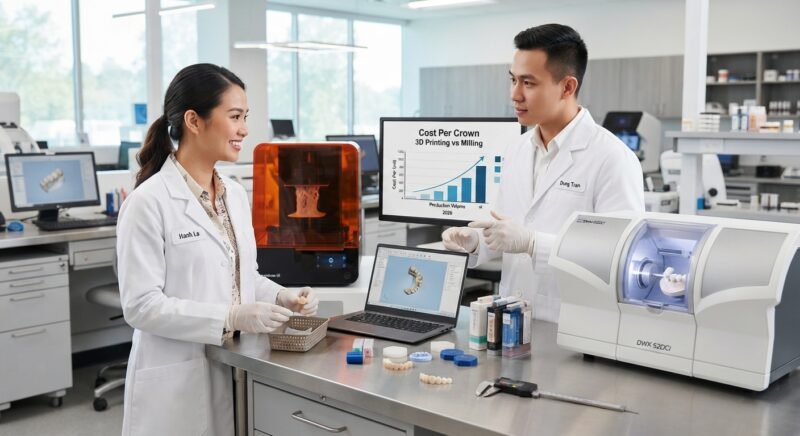
Do You Need Design Capacity for Your New Equipment?
Outsourcing CAD design services allows dental labs and practices to run milling or 3D printing equipment without hiring in-house designers, reducing overhead and speeding up production. Our expert digital design team provides precise crown designs compatible with all major milling and printing platforms, ensuring seamless integration and consistent quality while optimizing your cost per crown 3D printing vs milling 2026.
Step-by-Step Implementation Guide for Integrating 3D Printing or Milling in Your Dental Lab
Successfully adopting 3D printing or milling technology for crown fabrication requires more than just purchasing equipment. It involves a strategic, stepwise approach to ensure seamless integration, optimize costs, and maintain quality. This guide breaks down the process into practical steps, using real-world insights from dental labs and DSOs.
1. Conduct a Needs and Capability Assessment
- Volume and Case Complexity Analysis: Review your lab’s or practice’s average monthly crown volume and the types of cases you handle. High-volume labs may benefit differently from these technologies than low-volume or specialty labs.
- Staff Skills Evaluation: Assess whether your current team has experience with CAD/CAM software, digital design, and equipment handling. Identify training needs upfront.
- Budget and Space Planning: Consider space availability for new equipment and allocate a realistic budget including hidden costs (software licenses, materials, maintenance contracts).
2. Select Technology Based on Strategic Fit
- Match Technology to Case Types: For instance, labs specializing in complex zirconia crowns might lean toward milling, while labs focusing on resin or hybrid materials could prioritize 3D printing.
- Evaluate Multi-Functionality: Some milling machines also mill implant bases or bridges, while some 3D printers handle multiple types of dental appliances. Selecting versatile equipment can optimize ROI.
- Vendor Demos and Trials: Arrange hands-on demos and pilot projects before finalizing purchases to understand real-world performance and workflow impact.
3. Develop Standard Operating Procedures (SOPs)
- Design-to-Production Workflow: Map out each step from digital impression scanning, software design, to final fabrication and finishing. Define quality checkpoints.
- Material Handling and Storage: Establish protocols to manage sensitive materials like resins or ceramic blocks, including storage conditions and shelf life tracking.
- Post-Processing Steps: For 3D printing, curing and cleaning processes must be standardized; for milling, polishing and sintering protocols should be documented for consistency.
4. Train and Certify Staff
- Structured Training Programs: Implement training modules for machine operators, designers, and quality control personnel.
- Cross-Training: Encourage knowledge sharing between design and fabrication teams to reduce bottlenecks and improve problem-solving.
- Certification and Competency Checks: Regularly assess staff proficiency to maintain high-quality output and minimize errors.
5. Monitor, Measure, and Optimize
- Track Key Performance Indicators (KPIs): Monitor cycle times, material usage, rejection rates, and cost per crown data.
- Continuous Improvement: Use feedback loops to refine workflows, adjust material orders, and update SOPs as technology and market conditions evolve.
- Regular Maintenance Schedules: Include equipment calibration and software updates to avoid costly downtime and maintain precision.
Common Mistakes When Choosing Between 3D Printing and Milling—and How to Avoid Them
Choosing the wrong fabrication method can lead to wasted investments, increased costs, and compromised crown quality. Understanding typical pitfalls can help dental labs and DSOs make smarter decisions.
Mistake 1: Underestimating Total Cost of Ownership
Many focus only on upfront equipment costs, ignoring long-term expenses like consumables, maintenance, labor, and software upgrades. For example, a low-cost 3D printer may have expensive proprietary resins and frequent part replacements, inflating cost per crown. Conversely, milling machines may require costly ceramic blocks but have lower hourly labor costs due to automation.
Tip: Calculate detailed total cost models including all hidden costs and amortize over expected crown output to get an accurate cost per crown.
Mistake 2: Ignoring Material Compatibility and Quality Variability
Material choice significantly affects crown longevity and patient satisfaction. Some 3D printed resins might not match the strength or aesthetics of milled ceramics, leading to higher remakes or chairside adjustments.
Tip: Validate materials through clinical trials or case studies before committing. Consider hybrid workflows where milling is used for high-strength crowns and printing for temporaries or specialized cases.
Mistake 3: Neglecting Workflow Integration Challenges
Introducing new technology without aligning it to existing digital workflows causes inefficiencies. For example, incompatible CAD software or file formats can create bottlenecks, increasing turnaround time and costs.
Tip: Ensure hardware and software compatibility upfront. Pilot test complete workflows from scanning to final crown delivery.
Mistake 4: Overlooking Training and Human Factors
Even the best technology fails if staff lack proper training or resistance to change slows adoption. Mistakes in design or machine operation can increase waste and reduce output quality.
Tip: Invest in ongoing training and foster a culture open to innovation and continuous learning.
Cost vs. Quality Trade-offs: Real-World Examples from Dental Labs in 2026
Balancing cost and quality remains a critical challenge. Below are case studies from dental labs illustrating how they navigated this balance.
Case Study 1: High-Volume Lab Prioritizing Efficiency
A midsize lab producing over 500 crowns monthly opted for advanced milling technology with automated block changers. Although the upfront investment was high ($250,000+), the lab achieved a cost per crown of $18 due to reduced labor and material waste. Quality was consistently high, with a remake rate below 1%. This was achieved by using high-quality zirconia blocks and integrating seamless CAD/CAM workflows.
Case Study 2: Boutique Lab Focusing on Aesthetic Crowns
A boutique lab specializing in anterior crowns chose a hybrid approach—3D printing for temporary crowns and milling for final restorations. This approach allowed them to keep temporary costs low (about $6 per crown) while maintaining premium quality for final crowns (cost per crown around $40). The trade-off was slightly longer turnaround times due to dual processes but higher patient satisfaction with aesthetics.
Case Study 3: DSO Seeking Cost Reduction Across Multiple Locations
A dental service organization with multiple clinics standardized on 3D printing for crowns to reduce logistics and shipping costs. They negotiated bulk resin purchases, bringing material cost down by 12%. However, initial quality issues caused a 5% remake rate. By implementing rigorous quality control protocols and staff training, they reduced remake rates to 2% within six months, lowering effective cost per crown.
Checklist for Evaluating 3D Printing and Milling Equipment Vendors in 2026
Selecting the right vendor is as important as choosing the right technology. Use this checklist to make an informed decision:
- Technology Compatibility: Does the equipment support your preferred materials and integrate with your existing CAD/CAM software?
- Equipment Reliability: What is the documented uptime and failure rate? Request references from labs with similar volume.
- Training and Support: Does the vendor offer comprehensive training, certification programs, and responsive technical support?
- Consumables and Material Options: Are materials proprietary or open platform? What are the costs and availability of consumables?
- Software Updates and Licensing: Are software upgrades included or charged separately? Is the license perpetual or subscription-based?
- Maintenance Requirements: What is the recommended maintenance schedule and associated costs? Are maintenance contracts optional or mandatory?
- Scalability: Can the system be expanded or upgraded as your lab grows?
- Turnaround Time: What are typical cycle times per crown, including post-processing?
- Warranty and Service Agreements: What warranty terms are offered? Are on-site repairs included?
- Cost Transparency: Does the vendor provide a detailed breakdown of all costs, including hidden fees?
Contact us today to learn how our dental lab CAD/CAM digital design outsourcing can streamline your crown fabrication and improve your bottom line.